Day-trading desk
Sky Trader
A browser trading desk for one trader: live charts for your stocks, every order type, options, alerts and notes, connected to your own Alpaca account.
- Watch
- Alert
- Review
- Order
- Track
Risk note. Sky Trader is trading software, not investment advice. Trading stocks and options can lose money, including more than you put in when using margin or certain option strategies. You trade on your own Alpaca account and are responsible for every order. Results on a paper account do not guarantee results with real money.
One desk, one trader
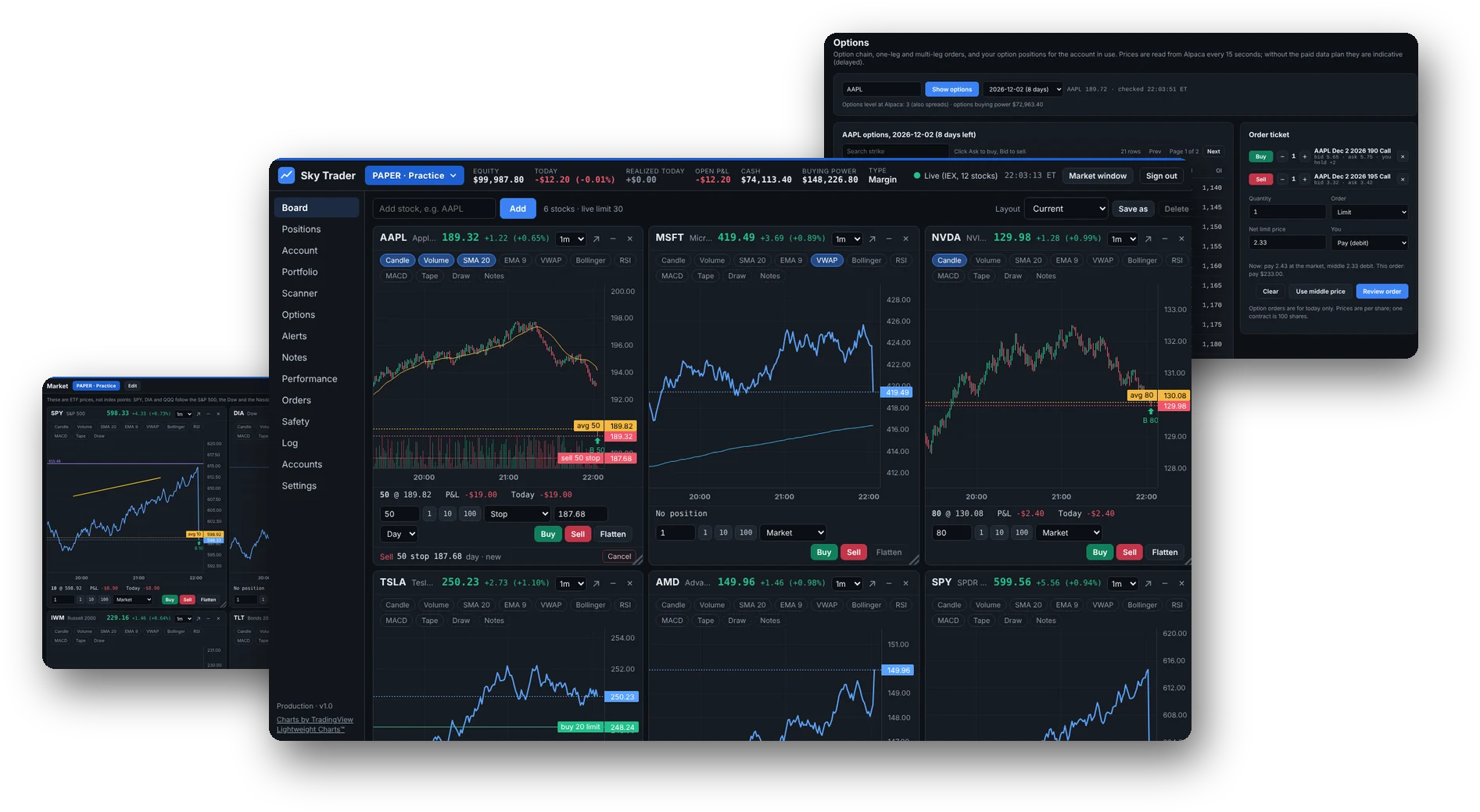
Day traders often juggle a broker website, a charting tool, a notebook and a spreadsheet. Sky Trader puts the charts, the order ticket, the positions and the notes for every stock you follow on one screen, and adds more windows when you have more monitors.
It runs on your own server and talks to your own Alpaca account, paper or live. Prices stream in real time from Alpaca; orders go straight to Alpaca after you review them. Several accounts can sit side by side, each with its own colour, layouts and history.
Modules
Board
Live tiles for the stocks you choose, each with candles, volume, indicators and the tape. Drag, hide and resize them, save layouts, and open more windows for other monitors.
Trading
Market, limit, stop, stop-limit, trailing stop, bracket and OCO orders. Every order is reviewed before it is sent; chart-click orders, hotkeys and one-click mode are there when you want them, off by default.
Market window
SPY, DIA and QQQ for the market, TLT, IEF and SHY for bonds, in a window of its own you can keep on a second screen.
Positions and account
Holdings, today’s and open P&L, cash, buying power, equity charts and the full Alpaca activity history.
Portfolio and scanner
Your stock list in groups with live switches, plus market movers checked every minute and a list of up to 100 of your own stocks.
Options
Option chains, one-leg and multi-leg orders up to four legs, a payoff preview and exercise controls.
Alerts
Price, percent move, VWAP, SMA and EMA crosses, RSI and volume rules, with optional email and desktop notices.
Notes
Research notes and daily market notes with pictures and attachments, tied to stocks or the whole market, searchable by date and tag.
Performance
Realized results worked out from your fills: win rate, profit factor, average win and loss, and P&L by day, week, month or stock.
Orders and log
Every order and every action, who and when, with search and CSV download.
Built for safety
No surprises on the ticket
Paper and live accounts look different at a glance, and every order shows a review before it is sent.
- Coloured account button on every screen
- Review and confirm before each order
- Hotkeys and one-click mode off by default
- Orders are never resent on their own
Limits that hold
Limits are checked on the server before each order, so a wrong click cannot get past them.
- Largest order and daily loss limits per account
- Option contract and premium limits
- Kill switch: stop new positions, cancel or close all
- A code by email at every sign-in
Screens
The Board: live tiles with charts, order buttons and the account bar The Market window for SPY, DIA, QQQ and Treasury ETFs, on its own monitor Options chain with an order ticket for one to four legs Scanner: gainers, losers, most active and your own list Alerts on price, moves, crosses, RSI and volume Notes with pictures and attachments, linked to stocks or the market Performance: win rate, profit factor and P&L by day, week or month Safety limits and the kill switch, checked on the server Paper and live Alpaca accounts, each with its own colour
What you need
Your Alpaca account
- Paper or live API keys, tested before they are saved
- Free IEX data covers up to 30 live stocks
- Alpaca’s paid data plan for full market data
- Options level 2 to buy, level 3 for spreads
Your server
- Windows Server with IIS
- SQL Server, Express is enough
- An email account for sign-in codes and alerts
- A modern browser on each screen you trade from
Pricing
Sky Trader is sold as a licence for one trader. Ask for a quote and we will reply by email.