CRM and relationship journal
BizJournal
A relationship journal and sales workspace: the people, the conversations, the bids and the projects that follow, all in one linked chain.
- Contact
- Event
- Bid
- Project
- Delivery
One chain, one workspace
BizJournal keeps the people you deal with, every conversation you have with them, the bids you put in front of them, and the projects that follow from the bids you win, all in one place and all linked to each other. Almost everything in the application sits on a single chain of records.
Territories decide who can see which links in that chain. To-dos and reminders hang off it and surface on your dashboard and calendar, so nothing quietly falls through.
How it was built
- 50 hrsArchitecture and schema
- 50 hrsVibe coding
- About 100 hrsTotal build
The architecture and the database schema were designed by hand. More than 90% of the implementation code was generated by AI (Claude), and BizJournal is a full production system, not a proof of concept. SkyNet is what makes that workable: one language and one self-contained page at a time, so a model can reason about the whole application rather than a fragment of it.
The split is the point: the thinking is still yours, the typing is not.
Modules
Dashboard
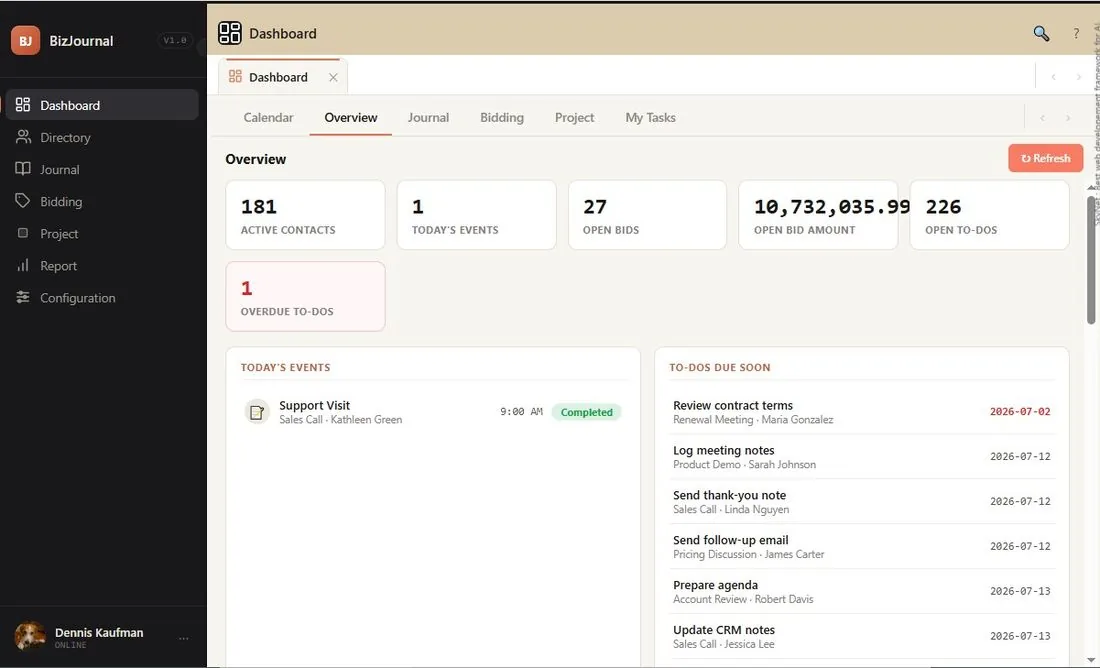
Live counts across Overview, Journal, Bidding, Project, My Tasks and Calendar tabs, with reminders surfacing on the calendar.
Directory
Contacts, organizations as an employment history (people move) and associates. Contact 360 pulls a person's full picture together.
Journal
A timeline of every call, meeting, SMS, email and note. Event types can carry a checklist copied onto the event as to-dos.
Bidding
Bids with line items, quantities and prices, their own to-dos and a pipeline view, from Open to Awarded, Lost or Closed.
Project
Started from an awarded bid, with a configurable task pipeline, a history of every status change and a delivery log per bid item.
Reports
Directory, journal, bidding and project reports plus a configuration audit trail. Every list exports to Excel.
Configuration
Pages, roles, permissions, territories, users, event types and options. Permissions decide what appears; territories decide whose records you see.
Search and Activity
The top-bar search opens any record's full Activity page from anywhere in the workspace.
Archive mode
Keep the working views clean without losing anything. Older records stay reachable when you need them.
How the pieces fit together
Scroll sideways to see the whole diagram.
Reading from the top: a territory decides whose records you see. A contact belongs to one or more territories and to an organization, which is really an employment history, because people move.
An associate is a member of your team; if their email matches a login account, the work assigned to them becomes "my tasks" for that person. An event is one interaction with one or more contacts, and its event type can carry a checklist copied onto the event as to-dos.
A bid holds line items and its own to-dos; when it is awarded you can start a project from it, with a task pipeline, a history of every status change and a delivery log per bid item. Journal, Bidding and Project all roll up into dashboard counts, Excel-ready reports and the audit trail.
The workspace
Scroll sideways to see the whole diagram.
You work in a single screen. The dark rail on the left lists the modules you are allowed to open; clicking one opens it as a tab across the top, so you can keep several modules open and switch between them. Each module has its own row of sub-tabs.
Pricing
The software itself is free. You pay only for getting it standing up and keeping it healthy.
- The softwareFree
BizJournal itself costs nothing. No per-seat licensing, no subscription, no usage tiers.
- What you getOn request
One email and you have everything: the SQL Server database and the installation files, ready to deploy. No forms, no signup.
- Installation and maintenanceOptional
Installation is a small one-time fee, and ongoing maintenance costs very little. Already have an IT team? They can install and run it themselves, with no ongoing fee at all.