Field service management
ServiceNet
The full life of a service job in one workspace, from the customer's first request through final sign-off.
- Request
- Scheduled
- Confirmed
- Dispatched
- In Progress
- Pending Review
- Finished
- Assurance
- Completed
One system, one journey
ServiceNet runs the complete life of a service job, from the moment a customer requests work through scheduling, dispatch, the on-site visit, quality review and final sign-off. Almost everything in the application is organized around that journey, so staff always work in the same place wherever a job currently sits.
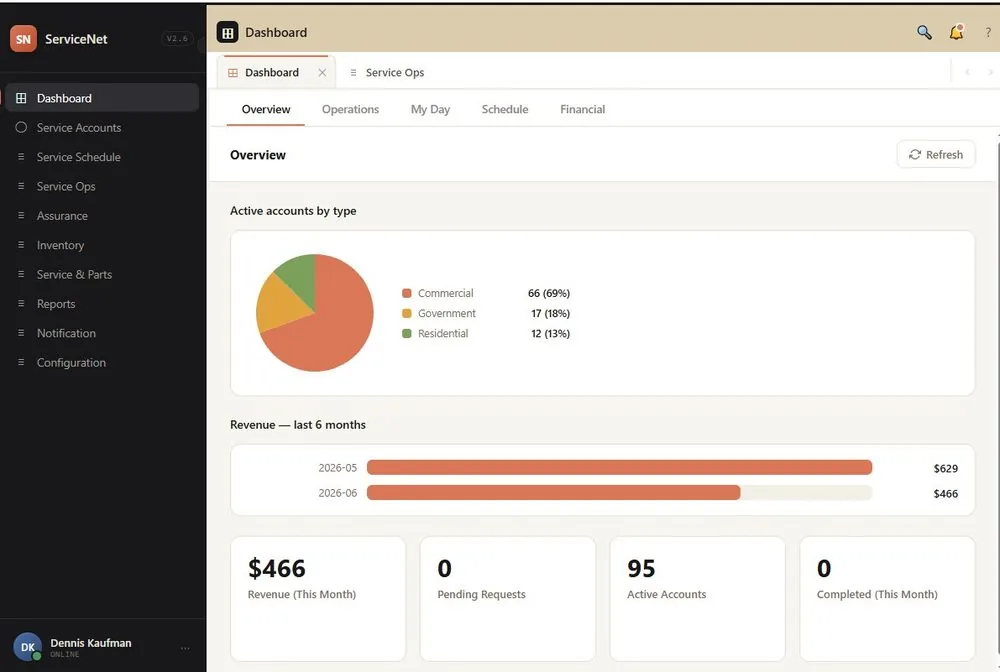
Staff work from a dark navigation rail on the left; each entry opens a module as a tab across the top, so several stay open at once. A second entry point, the public Customer Portal, lets customers book work themselves in four short steps. Their submissions land in the Service Request queue for staff to review and turn into real appointments.
How it was built
- 220 hrsArchitecture and schema
- 80 hrsVibe coding
- About 300 hrsTotal build
The architecture and the database schema were designed by hand. More than 90% of the implementation code was generated by AI (Claude), and ServiceNet is a full production system, not a proof of concept. SkyNet is what makes that workable: one language and one self-contained page at a time, so a model can reason about the whole application rather than a fragment of it.
The split is the point: the thinking is still yours, the typing is not.
Modules
Dashboard
Overview, Operations, My Day, Schedule and Financial tabs summarize active accounts, revenue, open pipeline by stage, exceptions and the day's work.
Account
Customer accounts, billing addresses and several service locations per account, with a Review and Save step on every edit.
Schedule
Book and confirm appointments, assign technicians, build estimates, manage technician skills and time off, and triage customer service requests.
Service Ops
Dispatch confirmed jobs, track work in progress by stage, review submitted results, handle reschedules and wrap up jobs that did not complete.
Assurance
The final quality gate. Review finished jobs before sign-off, raise and resolve issues, and approve completed work for invoicing.
Financial
Post completed jobs to the ledger, receive payments, track receivables and aging, and record adjustments.
Inventory
Parts stock, receiving, count adjustments, vendor returns (RMA) and a running log of parts used on service.
Service and Parts
The catalog behind everything else: services, service items, parts, promotions and vendors.
Reports
Operational and financial reports across every module, plus a full audit log. Every report exports to Excel.
Notifications
An inbox of system alerts, the delivery log, and per-type preferences for who is notified and how.
Configuration
Sites, roles, permissions, the page registry and user accounts. Permissions decide which modules, tabs and buttons appear at all.
Search and Activity
The top-bar search opens any customer's full Activity page, with service history, process detail and photos, from anywhere.
Field service lifecycle
Scroll sideways to see the whole diagram.
This map is the backbone of ServiceNet. Every job carries a status, and the actions available on it, meaning the buttons shown and the tab it appears under, depend on that status.
In the normal path (teal), a job is created in Service Schedule or converted from a customer request, becomes Scheduled and then Confirmed, is Dispatched to a technician, moves to In Progress as the work is done, and reaches Pending Review once results are submitted. A reviewer marks it Finished, it passes to Assurance for a final check, and it is signed off as Completed and ready for invoicing.
Exception paths (red) cover reversals and a reported No Show or Unable visit, which land in the Wrap Up tab of Service Ops to be rescheduled or cancelled. Assurance can also send a finished job back by requesting a reschedule (purple).
Beyond the back office
Customer Portal
A public Request Service page where customers book work themselves in four short steps. Requests arrive in the Service Request tab of Service Schedule, where staff review each one and convert it into a real appointment, or decline it.
- Your info
- Service
- Date and time
- Review and submit
Dispatch mobile app
Technicians work their day from a phone or tablet, with no separate install and no app store. They pick up the job list, work each job on site, and submit results straight back into the review queue.
- Get Ready: carry out parts for the day
- Start Service: the assigned job list
- Working a job: service items, parts, photos
- Service report and wrap up
Pricing
The software itself is free. You pay only for getting it standing up and keeping it healthy.
- The softwareFree
ServiceNet itself costs nothing. No per-seat licensing, no subscription, no usage tiers.
- What you getOn request
One email and you have everything: the SQL Server database and the installation files, ready to deploy. No forms, no signup.
- Installation and maintenanceOptional
Installation is a small one-time fee, and ongoing maintenance costs very little. Already have an IT team? They can install and run it themselves, with no ongoing fee at all.