Self-service reporting
SkyNet Reports
People build their own reports on company data, with no developer in the loop: pick the columns, add filters, and take the result as Excel or CSV.
- Build
- Save
- Run
- Waiting
- Running
- Ready
Reports without a ticket
Most report requests are the same question asked a little differently: the same data, other columns, another date range. SkyNet Reports hands that question to the person asking it. A developer prepares a view once, a Manager connects it as a data source, and from then on people choose their own columns, filters, sorting and totals and save the result as a report of their own.
Data comes from SQL Server, Oracle or a Web API, wherever those servers are. Reports run in the background, so one that takes an hour does not hold a browser open. The file lands in History, where it can be downloaded again, sent by email or produced on a schedule.
How it was built
- 40 hrsArchitecture and schema
- 24 hrsVibe coding
- 64 hrsTotal build
The architecture and the database schema were designed by hand: two programs, a SkyNet web application and a Windows service that runs the reports. Sign-in, users, roles and permissions came from S3Share, a design that already worked. From there, 100% of the implementation code was generated by AI (Claude).
Forty hours of thinking, twenty-four hours of vibe coding, and nothing typed by hand.
Modules
Dashboard
Your data sources on one screen, each a click away from its reports. Open areas stay as tabs across the top, so several can be worked on at once.
Reports
The report list of a data source: search, Favorites, Mine and Public, with copy, make public or private, and delete. Twenty rows to a page.
Report builder
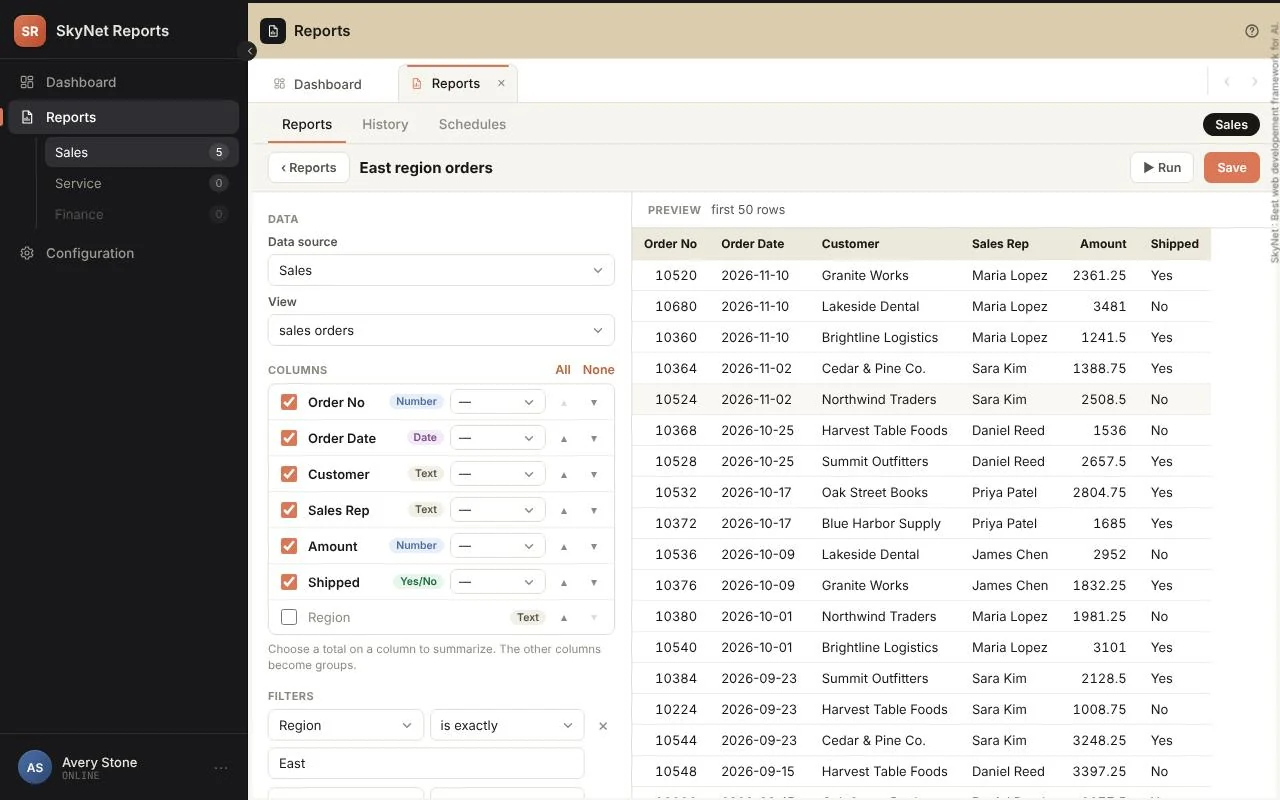
Pick a view, untick the columns you do not need and drag the rest into order. A live preview of the first fifty rows follows every change.
Filters, sorting and totals
Text, number, date and yes/no rules, including moving ones such as "last 7 days". Up to five sorts, and Sum, Average, Smallest, Largest and Count by group.
History
Every run and its file, with the status and the reason when one failed. Download again, send by email or run fresh. Kept ninety days by default.
Schedules
Daily, weekly or monthly runs at a set time, as Excel or CSV, with optional email. Pause one at any moment.
Data sources
Connections to SQL Server, Oracle and Web APIs, each with a Test button. Managers decide which people may use which source.
Users and roles
Invitations by email, User and Manager roles, and custom roles with their own permissions. The Manager role always keeps full access.
Settings and activity log
The product name, file and row limits, how long history is kept, allowed email domains, the reports folder and the Amazon S3 bucket. The log records sign-ins and changes, who and when.
From a view to a file
Scroll sideways to see the whole diagram.
Three people share the work, and each does their part once. A developer writes views in one schema of the source database and gives the columns friendly names; those names are exactly what users see. A Manager connects the database, ideally with a read-only account, and decides who may use it. A Web API is connected the same way, with lists that map its addresses to rows.
Users take it from there. A report is a view, the chosen columns, filters, sorting and totals, saved as private or public. A public report is seen by everyone who can use the same data source, and by no one else.
Every run carries a status. It waits in the queue, runs in the background with the row count so far, and ends Ready with a file. A run that stops is marked Failed, with the reason under the status, or Cancelled by the user or a Manager (red).
Beyond the browser
The Report Service
A Windows service does the running. It starts with Windows and needs nobody signed in, so long reports and overnight schedules finish on their own. A small icon by the clock shows its state and controls it.
- Green when running, grey when stopped
- Start, stop and restart from the icon
- Up to five runs at once per person
- Opens its own logs
Schedules, email and storage
A finished file does not have to be fetched. Schedule a report and send it to the people who need it, or keep every file in your own Amazon S3 bucket instead of a folder on the server.
- Daily, weekly or monthly, at a set time
- Up to ten recipients, approved domains only
- Large files are linked, not attached
- Amazon S3 as an option per data source
Pricing
The software itself is free. You pay only for getting it standing up and keeping it healthy.
- The softwareFree
SkyNet Reports itself costs nothing. No per-seat licensing, no subscription, no usage tiers.
- What you getOn request
One email and you have everything: the SQL Server database, the web application and the report service, ready to deploy. No forms, no signup.
- Installation and maintenanceOptional
Installation is a small one-time fee, and ongoing maintenance costs very little. Already have an IT team? They can install and run it themselves, with no ongoing fee at all.